Divshare limit ! C90 resetter trial in new place

Dear All Resetter,

We have problem with our download area in Divshare.
Since divshare is now limit the bandwith for free members :( ouch
and of course we are over limit already :)

so guys, we are now trying new places...that are still free
and also as I promised there is NO PASSWORD for this files

now i already upload only c90 resetters ( both version )
in mediafire .... if u have any opinion where the ideal place for our resetter
plz let me know :) just post in the comment or email me directly
at indoreset@yahoo.co.id
( the places must be unlimited bandwidth and unlimited file lifetime )

so here is the "trial" places for c90 resetters, enjoy
- indonesian version :
[JOIN OUR MAILING LIST TO GET DOWNLOAD INFO]

- singapore version :
[JOIN OUR MAILING LIST TO GET DOWNLOAD INFO]


plz do try the download area and tell me what you think ...

Happy Reset

Printer Lovers
Read More..

New Moderator in TOWN !

Please Welcome Our new Moderator

Felix ...... and also a already fixed our YAHOO Presence in this blog ... so plz feel free to ask

and for you that still asking about our mailing list is = indoreset@yahoogroups.com

to join is very simple, send blank mail to = 
                                     indoreset-subscribe@yahoogroups.com
to unsubscribe is simple too, send blank mail to = 
                                   indoreset-unsubscribe@yahoogroups.com

happy reset

ndry
Read More..

Canon Resetter Warehouse Gudang Canon Resetter

Just Another Resetter Collection

i350, IP1000, IP1100 IP1880 IP2500, IP1300 IP1700, IP1500, IP1200 IP1600 IP2200, MP Tool v.094, MP Tool v.092, IP Tool v.114, IP Tool v.115, Canon IP2270

join our free INDORESET FORUM !

enjoy!

felz
Read More..

Holy Week Greetings!

Have a peaceful Holy Week to everyone...

From: the Moderators
Read More..

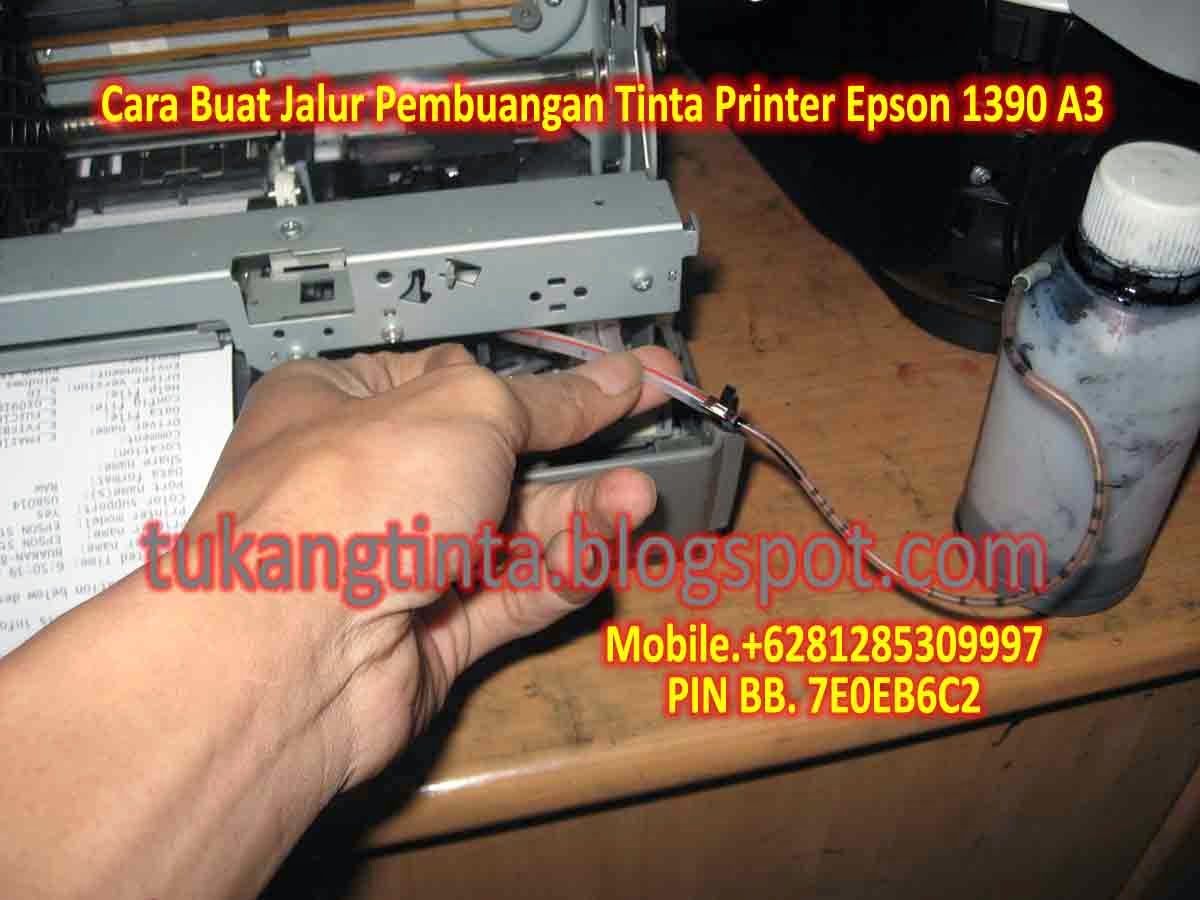
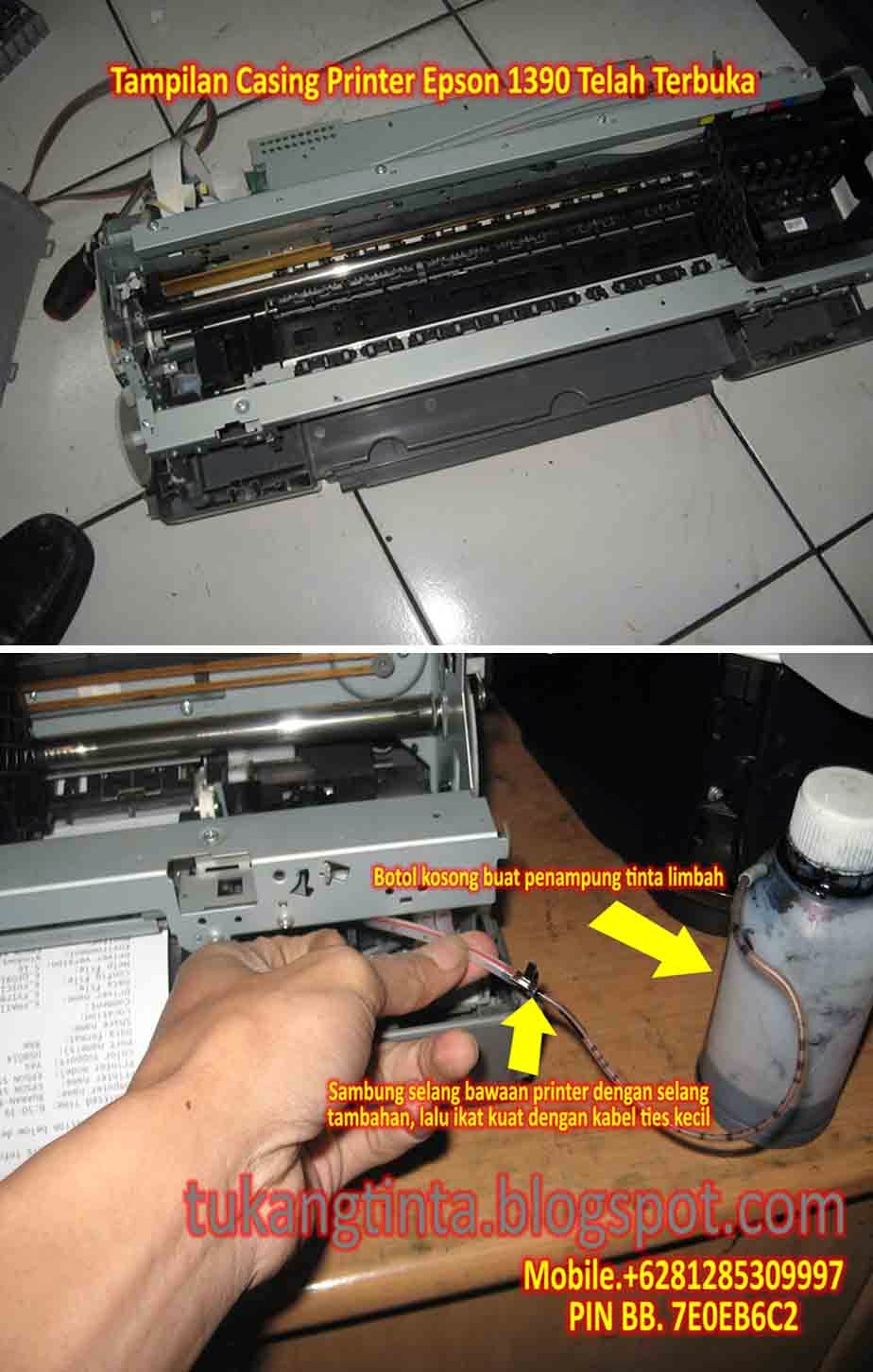
Cara Buat Jalur Pembuangan Tinta Printer Epson 1390 A3

http://tukangtinta.blogspot.com/
Hello Sobat, Kali ini Bang Mone dari TukangTinta.Com ingin membagikan pengalaman tentang " Cara Buat Jalur Pembuangan Tinta Printer Epson 1390 A3 ", perlu diketahui sobat dimana didalam mesin printer kita ada namanya bak atau busa penampungan tinta limbah dan penampungan tinta limbah akan penuh pada waktunya tergantung aktivitas pemakaian sobat. saat ini Bang Mone ingin berbagi bagaimana cara buat jalur pembuangan tinta limbah pada printer Epson 1390 A3, Langsung saja sobat lihat langkahnya dibawah ini :

Langkah Awal, siapkan peralatan yang dibutuhkan seperti :
  1. Obeng Plus.
  2. Obeng Min.
  3. Gunting.
  4. Selang Tambahan.
  5. Lakban Hitam.
  6. Botol Kosong.
  7. Kabel Tis Kecil.
  8. Bos Infus Uk.3.0 Inch atau Solder Listrik.
http://tukangtinta.blogspot.com/

Pertama buka casing printer sobat dahulu dengan benar, setelah casing printer terbuka, lalu kita cari selang pembuangan limbah bawaan printer kemudian sobat sambung dengan selang tambahan lalu ikat dengan kabel tis kecil, setelah selesai sobat lubangi bagian samping atau dibelakang casing printernya dengan Bor Infus Uk.3.0 Inch atau dengan Solder Listrik, setelah langkah akhir selesai sobat rakit dan pasang kembali casing printer seperti semula lalu tinggal pasang jalur selang yang telah dibuat dimasukkan dibotol kosong.


Selesai.


Sekian artikel Bang Mone dari TukangTinta.Com mengenai " Cara Buat Jalur Pembuangan Tinta Printer Epson 1390 A3 ", Semoga dapat bermanfaat, berguna dan menginspirasi sobat semua.

> Download Driver Printer Epson 1390 A3 klik disini

Salam,
Bang Mone dari TukangTinta.Com
www.tukangtinta.com
Mobile.+6281285309997
PIN BB 7E0EB6C2
Read More..

New Canon Resetter 2010

This is the latest resetter for canon MP198, MP258, MP276, MP496, MP558, MP568, and MP648.

The following are the steps that must be done:


  1. Turn on the printer to service mode. how to enter service mode is :
  • While the printer is OFF, press and hold the Start/Stop button (Resume/Cancel in some other models).
  • While holding the Start/Stop button, press and hold the POWER button.
  • When the POWER LED (green light) lit, release the Start/Stop button (still holding the POWER button).
  • Press the Start/Stop button TWICE (still holding the POWER button)
  • Release the POWER button.
  • Wait for the LCD to display 0 (zero).
  1. After the display is 0, attach the printer usb cable to pc, then there will be detected new device (its normal)
  2. Run service_tool 1050.exe
  3. Confirm detected usb-port numbers on usb port column.
  4. Click the MAIN ink counter reset button, make sure there is paper in the paper feed, because the printer will print after the process is complete.
  5. Click platern ink counter reset button, the printer will print again.
  6. Turn off the printer.
  7. Your printer is ready for use again.


HERE IS THE DOWNLOAD LINK

JOIN FREE INDORESET FORUM


Enjoy!

felz
Read More..

HP Deskjet 1050 All in One Printer – J410a Driver

HP Deskjet 1050 All-in-One Printer – J410a Driver and Software Download for Windows 7 – Windows Vista – Windows XP

Microsoft Windows 7 – Vista – WinXP
HP Deskjet Basic Drivers (32Bit)  DJ1050 J410 Basic x86 231
HP Deskjet Full Feature Software and Drivers (32bit-64bit) DJ1050 J410 231
ApplicationShop for HP Supplies Download
Utility – Diagnostic
HP Printer Install Wizard for Windows 7 Download
HP Print Diagnostic Utility Download
Mac Os
HP Deskjet Full Feature Software and Drivers – Mac OS X v10.5 and v10.6  Download


http://printerdrives.net
Read More..

Tablet Day in the USA

Microsofts Surface includes many familiar features
Today is the day that the Microsoft Surface 2 ships, and the new Apple iPad(s?) are announced.

Its interesting that the tablet battle (which of course, also prominently includes Android-based machines, from Amazon, Google, and others) is really coming down to "do you want something really new" versus "do you want something that is kind of new, but still works in old familiar ways?" The latter choice includes connecting to the old familiar peripherals, like printers, via old familiar connections, like USB, and running old familiar software, like Microsoft Office. (See above - though note this screen shot from the Microsoft website is for the Surface 2 Pro, which is available in early 2014.)

When voting with their dollars, end users seem to be opting heavily for the first option, in the form of iPads, Kindle Fires, Nexus 7s, and the like. And me? Actually I own a variety of them, but found myself depending heavily on a Samsung Chromebook while traveling last week - go figure!
Read More..

More on Lexmarks Wireless X6570 All in One

I wrote my November 2007 column, from a mostly users perspective (see "Observations: Wi-Fi Printing -- Look Ma, No Cables"), exploring the emerging "standard" wireless interface on many of todays new printers. I used a Lexmark (NYSE LXK) Wireless X6570 All-in-One as my subject device, and found its printing capabilities to be more than satisfactory.

Since finishing the column, Ive continued to use the Lexmark AIO, and recently found a post "Berlinds Testbed" blog from ZDNets David Berlind on his experiences with the same all-in-one (see "HP, eat your heart out. At $150, Lexmark’s WiFi All-in-1 printer/copier/scanner/fax got my cash".) Davids post contains an interesting account of his purchase of the Lexmark product, including receiving surprisingly knowledgeable help from his local Staples store. And like me, he found the Wi-Fis biggest benefit to be location flexibility. (The basement-based Linux print server he replaced also rang true!)

Although I wasnt out to perform a full-scale review on the X6570, I still avoided reading other reviews before my own hands-on experiences with the products, in order to maintain my objectivity. After the fact though, its good to see someone elses similar experiences. This includes my post-column work with some of the products other functions, including successfully copying and scanning using the all-in-ones OCR capabilities. I recommend the Berlind post from earlier this month, including the up-to-now 24 comments, which (not surprisingly) run the gamut of pros and cons on everything from Wi-Fi itself to ink usage and color print quality.
Read More..

Xerox WorkCentre 4150 Jams or Clear the Jam in the Print Engine

If your Xerox WC 4150 is displaying "Clear the Jam in the Print Engine" or constantly jams as paper exits the machine you should check and possibly replace the fuser actuator (part# 120N00534)

Xerox WorkCentre 4150 Fuser Actuator:  Part# - 120N00534.    

Read More..

How to sync blogger post in Facebook Notes

Getting more traffic to read article that you write is what blogging is all about. Otherwise it is not exciting as there are no one to read or engage what you have written. One of the ways to do this is using Facebook social network site. Usually Facebook audiences are those who are more closer to you as the network groups are mostly friends and families. They are more like to engage in your blogs as feel sense of common interest towards what you do.

Basically there two places to automatically sync blogger post in Facebook using the same method "Facebook Notes". The first place to sync blogger post is the main profile page of your Facebook and the other one is Facebook custom page. How to do it follow the step below.

Post automatically on the Facebook Notes main profile page:

1. Facebook "Profile"⇒Notes
2. Click "Write Notes"
3. Click on any of the Facebook Notes options i.e. "My Notes"
4. Click on the "Edit Import Settings"
5. Go to your blog address i.e. http://howtodosteps.blogspot.com
6. Scroll down to the bottom page of the blog and look for "Subscribe to: Posts (Atom)> Right click on the post atom and copy the url address i.e. http://howtodosteps.blogspot.com/feeds/posts/default
7. Paste it on the Facebook notes> click "Start Importing". Done!!
8. Try to make new post on your blogger and go to your pagebook profile page you will see it will automatically post


Post Blogger on Facebook page (assumed Facebook page already created)

1. On Facebook left side bar click "Pages"⇒Select page
2. Edit Page⇒Apps
3. Notes>Go to App (If not yet enabled click Edit Settings)
4. Write Notes>Click any options i.e. My Notes
5. Edit Import Settings
6. Go to blogger blog⇒Scroll down to bottom page and get the URL from the "Subscribe to: Post (Atom)
7. Paste to Facebook Notes "Web URL" Start Importing. Done!!
8. To test: Try to write a post on blogger and go to your Facebook page. It should automatically post on the Facebook page Wall.


Note: Other blogs with RSS feed URL such as Wordpress, Typepad, Livejournal, etc also can be post automatically to Facebook Notes. Having Facebook page if you have particular topics where people are engage in group discussion.
Read More..

Back in Rancho Mirage Lyra Imaging Symposium 2012

As the "official blogger" of the Lyra Imaging Symposium for a number of years now (though not all 15!), I will be at it again, but this year, over at the Imaging Insider blog. Well post a daily summary there, but offer more "real time" bite-size pieces on Twitter.

While you can keep track of my Symposium tweets in the right-hand column here, suggest a more effective way is to track the hashtag #Lyra12 on a conventional Twitter app or the web site itself (twitter.com).
Read More..

How to create Form in Ms Word 2007 basic guide

Form is very useful to create digital documents for Survey, Examination Paper, Receipts, etc purposes, where users can key in their data digitally without printed it on physical papers. Here is basic simple instruction how you can start creating a form in Ms. Word 2007. You can find sample Forms template created by Microsoft on this Office Form Template.

1. Click on Developer Tab
2. Inside the Controls Container you will see all the Forms Tool. These are all the tools you need.
  • Rich Text
  • Text
  • Picture Content Control
  • Combo Box 
  • Drop Down-List
  • Date Picker 
  • Building Block Gallery
  • Legacy Forms & ActiveX Controls

3. To add any of the Controls above just click the icon and it will automatically added document. Example Drop Down-List control.


4. Then click "Properties"
to configure the properties according to your preference. Example below is the properties windows to add Drop Down-List.


5. Once you are done with the Form, you will need to protect it which allow the users to key in their data but NOT to edit the Format and Contents of the Form. To do that click on the


Read More..

Avast Free Antivirus Visthaux exe in Windows 7 Home Premium

This is an experience of using the Free Avast Antivirus. During the first few days using the programs everything was working normally, but after some updates it encounters the problem (Visthaux.exe) and my PC starting to get slow big time. The slowness occurrs during Windows Startup and when using Google Chrome browser. Apart from that it prevents the Avast from running at start up and display a message on the system tray "Turn On Avast!! Antivirus (Important) -- by clicking on it, leads to the message options

1. Yes, I trust the publisher and want to run this program
2. No, I would like to verify the identity of the publisher before running this program.

After a few attempts neither one of these options will stop the message to appear on the system tray including restarting Windows will still be the same.

The Visthaux.exe corruption prevented the Avast to turn on during windows at startup. Based on Avast forum (http://forum.avast.com/index.php?topic=39395.0) this can be resolved by updating the Certificate by going to the file itself at C:program filesavast softwareavastVisthaux.exe and right click on the Visthaux.exe and click properties and switch to "Digital Signatures" page, select the signature in the list and click on "Details". Although the instruction provided by Avast indeed solved the problem and enabled back the Avast Antivirus to run at Windows startup but my PC and Google Chrome browser still slowing as usual.

Running out of ideas what caused the Windows and Chrome browser to lags, I have decided to uninstalled avast free antivirus using its uninstaller which can be downloaded here http://www.avast.com/uninstall-utility.
The un-installation processed must go through Windows Safe Mode to disable all Avast functionality from executing before running the uninstaller.

Once uninstalled, have restarted my PC and everything goes back to normal. Windows Start up and Chrome all running at normal speed as it used to be. Thats how i know the Avast Free Antivirus really brings the trouble especially when it encounters the Visthaux.exe.

In addition, after the removal all Avast software registry were removed completely except Visthaux.exe still exist exactly in this registry folder (HKEY_USERSS-1-5-21-3128674079-2282775409-758013598-1000SoftwareMicrosoftWindows NTCurrentVersionAppCompatFlagsLayers). To remove this Go to Windows Start>> Type Regedit and run>> Click on the Edit tab and Find "Visthaux.exe" and delete it from the registry. This should put Avast out completely from the system.


Reminder: Visthaux.exe looks a legitimate software provided by Avast Antivirus Software Application. But there is something really wrong with this piece of file, i would consider it as malicious as it slows down PCs and Browsers.


Read More..

HP Celebrates 40 Years in Boise!

Before it became the home of the incredibly successful HP LaserJet printer, launched in 1984, Boise, Idaho was already one of the early Hewlett Packard "outposts" established by the company that started Silicon Valley. Going back to 1973, Idaho joined other states like Oregon and Colorado in giving the firm, started by Bill Hewlett and Dave Packard in 1939 in Palo Alto, California, some "breathing room". In Boise, beginning in the 1970s, R&D, marketing, and manufacturing efforts blossomed outside the high-rent Bay Area, concentrating on storage devices (tape and disk) and printers to go along with the companys market-leading minicomputers of the day.

40-year-old front-page news in The Idaho Statesman announced HPs plans to expand to Boise
On June 5, 2013, HP celebrated its 40th year in Boise - defined in terms of becoming Idaho property owners. In an Idaho Statesman front page from June of 1973, on prominent display at the afternoon gala for current employees, past "alums", and local officials, news about HPs purchase of 150 acres of farmland just west of Boises then-city limits, featured the headline, "Hewlett Packard Discloses Plans for Boise Area Plant" (see above). That milestone would lead to the beginning of one of Idahos most important economic developments in its history.

Pradeep Jotwani, HP Senior VP, and Idaho Governor "Butch" Otter, were on hand to help celebrate
The traditional "HP beer bust" atmosphere, on a beautiful Boise afternoon and complete with a display of classic cars from the 1970s, was attended by a large crowd of invited guests, including current  printing executive Pradeep Jotwani (Senior Vice President managing the LaserJet business), as well as Idaho Governor Butch Otter. In brief remarks, tribute was paid to the hard work and dedication of the throng of individuals, both in technology and business development, and also the continuing presence of HP employees, past and present, locally involved with time and monetary contributions in the greater Boise area-community. The point was accentuated by a gift to The Idaho Foodbank of a check for over $40,000, the result of a 2013 fund-raising campaign.

I am, of course, part of the history of HP in Boise, having been recruited by the company during the final weeks of earning my MBA in 1981, and then completing 25 years of employment in 2005. And while I still cover the company as a mostly-objective industry analyst, the event today was full of pure (and no doubt biased) pride, having played at least a small part of Idaho, and the overall technology industrys economic development, and future too!
The late Dave Packard and Bill Hewlett posed during their later years in front of the Palo Alto "garage" where it all began in 1939. They spurred the move to expand the company to "outposts" like Boise, Idaho during the 1960s and 1970s
(Note - in September, 2012, I covered the passing of the "original" HP-Boise executive, Ray Smelek, who along with Hewlett and Packard spearheaded the establishment of the Boise site - see
September Observations - How Boise, Idaho Became a Printer Capital".)
Read More..

Microsoft Bing making gains in early returns even with this blog

The recently announced Microsoft Bing search engine, announced just the week before last, is making some good headway, according to comScore numbers as reported by TechCrunchs Robin Wauters (see "comScore Study: Bing Is Off To A Very Good Start").

A Statcounter study reported last week that Bing searches (when combined with other existing Microsoft Search sites) had even surpassed Yahoo! for at least a day, and even at this humble blog, Microsoft searches have recently approached double-digits, though still far behind Yahoo! and king-of-the-hill Google.

While its easy to fall prey to the thinking Microsoft generally has lost its marketing (and execution) touch that often was felt even in the printer business, it seems things are off to a good start with Bing. (Confession -- I fell for the cynics view when my first page load of the Bing site came up with the old "Live Search" page last Monday.) And as Wauters points out:
But boy is it good to have some real competition in search going, even if just for a short while.

I couldnt have said it better!
Read More..

Blog Archive

Diberdayakan oleh Blogger.