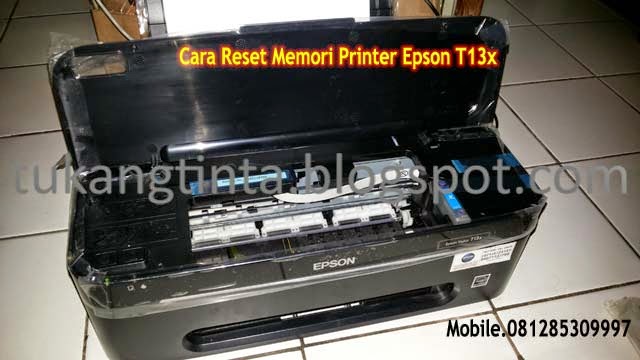
Cara Reset Memori Printer Epson T13x

http://tukangtinta.blogspot.com/
Hello Sobat, Kali ini Bang Mone dari TukangTinta.Comingin membagikan pengalaman tentang Cara Reset Memori Printer Epson T13 atau T13x, indikasi awal printer tidak bisa digunakan saat mau melakukan test print dan pesan di monitor komputer ada tulisan warning " General Error ", lalu di lampu printer blingking berkedip warna merah, langsung saja sobat lihat langkah langkahnya dibawah ini :

Langkah awal, printer dengan keadaan hidup dan kabel usb terpasang dengan benar, lalu sobat download dahulu program resetter Epson t13 klik disini dan Saat mau menjalankan program resetter non aktifkan dahulu anti virus dikomputer sobat.

http://tukangtinta.blogspot.com/


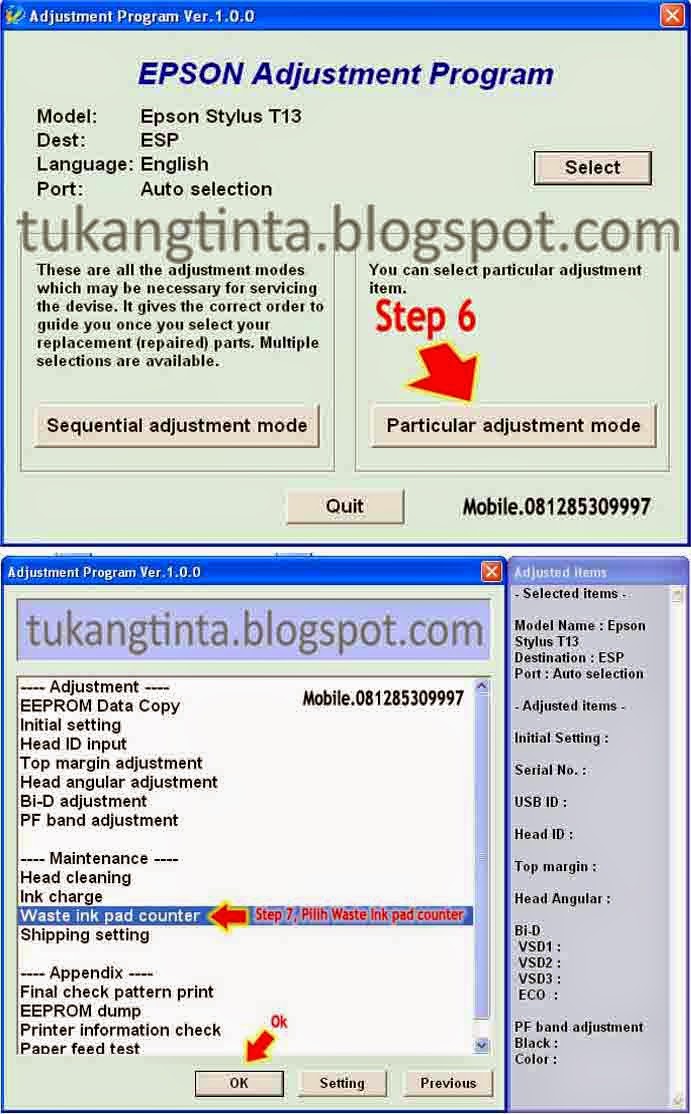
Buka dan jalankan program resetter Epson T13nya, klik 2x " AdjProg " setelah itu, 
Step 1  klik Accept


Step 2 klik Select, 
Step 3 untuk memilih Type Printer sobat, 
Step 4 Destination pilih ESP, 
Step 5 Port pilih Auto Selection lalu klik Ok,
http://tukangtinta.blogspot.com/


Step 6 klik menu Particular Adjustment Mode, 
Step 7 pilih menu Waste Ink Pad Counter lalu klik Ok,
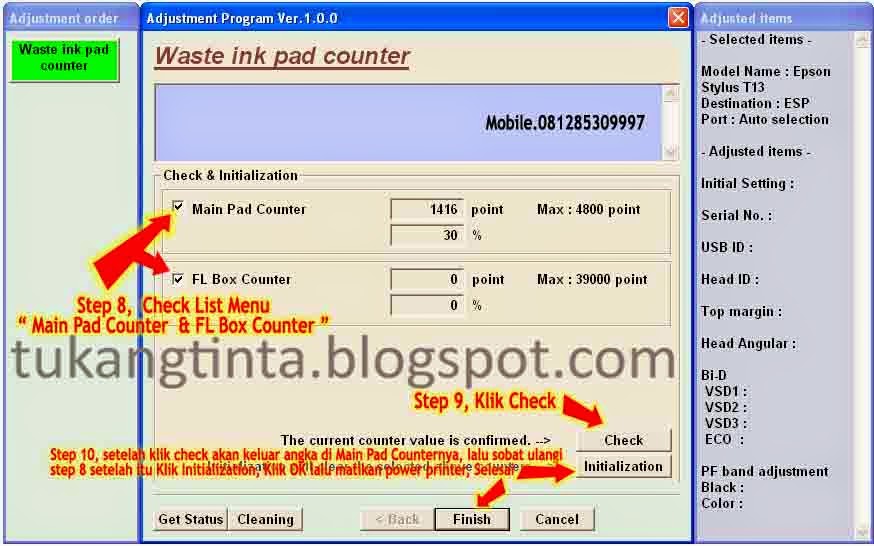


http://tukangtinta.blogspot.com/Step 8 klik Check List Menu Main Pad Counter dan FL Box Counter,  
Step 9 klik Check nanti akan timbul angka di menu Main Pad Counter yang artinya angka yang tampil itulah yang harus kita Reset menjadi 0. setelah sudah lalu sobat ulangin Step 8 kemudian langsung ke Step 10 klik Initialization, klik OK lalu sobat disuruh matikan power printernya tapi jangan cabut kabel powernya.

Selesai.


Sekian artikel Bang Mone dari TukangTinta.Com mengenai Cara Reset Memori Printer Epson T13 dan jika sobat ingin melihat artikel lain Bang Mone Cara Head Cleaning Printer Epsonklik disini atau Cara Menganalisa dan Memperbaiki Masalah Printer Epson (General Error) klik disini , Semoga dapat bermanfaat, berguna dan menginspirasi sobat semua.

> Download Driver Printer Epson T13 klik disini
> Download Program Resetter Epson T13 klik disini

Salam,
Bang Mone dari TukangTinta.Com

www.tukangtinta.com
Read More..

Cara Melancarkan Print Head Printer Epson R230

Hello Sobat, Kali ini Bang Mone dari TukangTinta.Com ingin membagikan pengalaman tentang " Cara Melancarkan Print Head Printer Epson R230 ", perlu diketahui sebelumnya sobat untuk masalah hasil print yang kurang baik pada printer epson, masalah paling umum itu bisa terjadi pada ketidaklancaran pada print headnya, bisa juga dari cartridgenya ataupun dari instalasi infusnya, nah!! kali ini Bang Mone dari TukangTinta.Com ingin berbagi bagaimana cara yang benar untuk melancarkan print head epson,

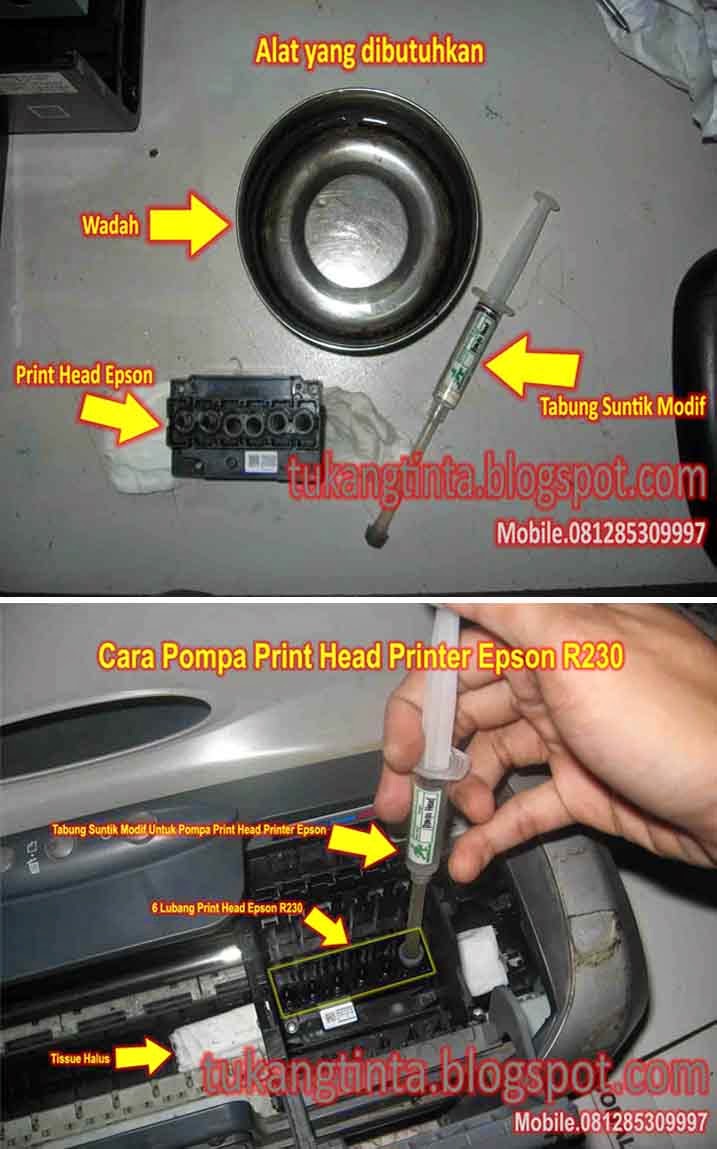
Pertama sobat siapkan dahulu perlengkapan yang dibutuhkan, seperti ;

http://tukangtinta.blogspot.com/
  1. Tabung suntik yang sudah dimodif. (gambar saya sertakan disamping)
  2. Wadah atau tempat air hangat.
  3. Cairan pelancar print head khusus epson atau gunakan air hangat.
  4. Tissue halus.
Setelah semua perlengkapan sudah ada, taruh tissue halus dibawah print headnya lalu pompa lubang print head yang hasilnya kurang baik, saat sobat pompa lubang print headnya pastikan tidak berat terasa atau lancar.


Selesai.


Sekian artikel Bang Mone dari TukangTinta.Com mengenai " Cara Melancarkan Print Head Printer Epson R230 ", Semoga dapat bermanfaat, berguna dan menginspirasi sobat semua.

> Download Driver Printer Epson R230 klik disini

Salam,  
Bang Mone dari TukangTinta.Com
www.tukangtinta.com
Mobile.+6281285309997
PIN BB 7E0EB6C2
Read More..

Laser scanner system and Laser failure detection hp laserjet p 4010 and 4015 series

The laser/scanner system forms a latent image on the photosensitive drum according to the VIDEO signals sent from the formatter. The main components, such as the laser driver and scanner motor, are assembled as a laser/scanner unit and controlled by the DC controller. The DC controller allows the laser to emit light according to the VIDEO signals. The laser beam passes through the lenses and enters the scanner mirror that is rotating at constant speed. The laser beam is reflected by the scanner mirror, passes through the lenses, and scans on the photosensitive drum.

Figure  Laser/scanner system


The laser scanner uses two laser diodes to scan two lines simultaneously, producing high-speed laser scanning. After receiving the print command from the host computer, the DC controller PCA activates the scanner motor, which rotates the six-sided scanner mirror. The laser-driver PCA emits light from the two laser diodes according to signals from the DC controller PCA. The two laser beams strike the six-sided scanning mirror and are directed through the focusing lenses and onto the photosensitive drum. The modulated laser beams generate the latent electrostatic image on the photosensitive drum according to the image data signals that the DC controller PCA sends.
1. As it receives a print command from the formatter, the dc controller outputs the SCANNER MOTOR
SPEED CONTROL signal (/ACC) and rotates the scanner motor in order to rotate the six-sided
mirror.
2. As the scanner motor starts rotating, the dc controller uses a LASER CONTROL signal (CNTO,
CNT1, CNT2) to receive the /BD INPUT signal (/BDI) and force the laser to emit light. The dc
controller detects the rotational speed of the scanner motor based on the timing the /BD1 signal is
input and controls the speed to keep it constant.
3. While the scanner motor rotates at a constant speed, the dc controller passes the VIDEO signals
from the formatter on to the laser driver PCA. The laser driver PCA emits light from the two laser
diodes according to these signals: VDO1, /VDO1, VDO2, A/DO2.
4. The two laser beams pass through the collimator lens and cylindrical lens and strike the six-sided
mirror that is rotating at a constant speed.
5. The laser beams, that are reflected off of the six-sided mirror pass through the focus lens and
reflective mirror and focus on the photosensitive drum. The laser beams scan the drum surface at
a constant speed.
6. As the six-sided mirror rotates and the laser beam scans the drum surface at a constant speed, a
latent image forms on the drum surface.

Laser failure detection

The DC controller determines a laser/scanner unit failure and notifies the formatter, if the laser/scanner unit encounters the following conditions:
• Laser failure: The laser intensity is not detected for a specified value when the laser is turned on
for a specified period during the scanner unit start-up period.
• BD failure: The BD interval is out of a specified value during a print operation.
• Scanner motor start-up failure: The scanner motor does not reach a specified rotation within a
specified period from when the scanner motor starts rotation.
Read More..

Blog Archive

Diberdayakan oleh Blogger.